Monday, February 24, 2014

Client side graphs

I came across many instances, where people jumped at some expensive client side libraries just by looking at the graphs. Here are some simple points you need to consider.

image

  1. Generating graph on client side is not a rocket science. Now its more and more simple, no one plays around with DIVs to create bar chart anymore.
  2. Most of the libraries use Canvas or SVGs for creating charts.
  3. Flot library is the best library available under MIT license. I have used it and i totally recommend it. Binding or customization is super simple. I have created newer types of charts in very short time.
  4. Use expensive libraries, only if you want swanky grids, edits and other UI features. Not just for graphs.
  5. You can play around with events easily and create what ever you want, like making nasty sound on hovering on some point :)
  6. For all short comings, you can find one more more plug-in. FlexiSlider is one of the great addin i found for handling touch.
  7. Use a thumb rule based on the budget you have where you set a threshold for number of plug-in you will be cherry picking before switching to a commercial library.
  8. Enjoy playing around with jQuery!

It’s about not to code

“You don't have to solve all problems through code – My Boss”

This was the quote from my conversations from one of our conversations. However i remember this every time i think of a solution for any problem that i deal with, while working on a software projects. Context has changed from the time he quoted this but i have followed same instruction many times.

This goes well with INVEST mnemonics associated with good User Story. I use the above quote for ‘Negotiating’ the scope of the user stories. As an architect, i have an advantage of having good understanding of the requirement as well as the system. This allows me to put forward options that are easier to implement at the same time solves the problem.  Couple of examples i want mention here, where i realized that i gained a lot.

1) I was working on a client-server application, which had an management portal for modifying some back end data. We had created an ASP.Net Dynamic data site for this. Now we had to restrict the access to this portal, only for admin users. Going by the standard implementation, we had to create roles, then associate users to roles and then give some UI where one can manage both. This would take quite a long time and we wanted this to be done for the first roll out. 

Here comes the negotiation part. We managed to convince the product owner that given 30 minutes notice, i will make anyone admin till next release. Overall, my product owner agreed to de-prioritize the story and moved it to next release. What i did there was used IIS feature to allow/deny access to a web application. As there were only 2-3 people who required admin access and possibility of it changes required was almost like once in a 6 month. 

image   

So, We managed to deliver this feature for first release under an hour. And the rest of the user management part of the story moved back to the backlog. I don't see this feature ever getting the daylight.

Friday, October 12, 2012

TFS30063–You are not authorized to access


Recently I received this complaint from someone, who was trying to connect to TFS using TFS client API.

Here is the code that my friend was using

NetworkCredential networkCredential = new NetworkCredential("guruholla", "******", "MyDomain");


Uri uri = new Uri("http://mytfsserver:8080/tfs");


TeamFoundationServer teamFoundationServer =  new TeamFoundationServer(uri.AbsoluteUri, networkCredential);


Console.Write("Connecting to Team Foundation Server {0}...", uri.ToString());


teamFoundationServer.Authenticate();


Console.Read();


After which I realized that, he did not have access to the default collection in TFS and he had only access to one of the collection. Changing the URL to directly point to the collection helped.


Uri uri = new Uri("http://mytfsserver:8080/tfs/birdCollection");


Moral of the story: See if you have access to default collection.

Tuesday, July 3, 2012

Should we upgrade to TFS 2012?

If you are a developer

You might find it as exciting or frustrating depending on the kind of visual studio you use. I use VS 2010 Prof and even if I upgrade to VS 2012, my license would be still prof. Here are some features that I find interesting and the license it would need.

image

I totally like code review feature and I always thought that this would be the solution that can help in auditing the development process compliance. sadly it needs ultimate Sad smile

codeReview 

Other features you might be interested in async Check outs, 3 way merges on check-in.

If you are not a Visual Studio user

Microsoft has done a fabulous job in rebuilding TFS Web access and making it a real sprint planning and tracking tool. They have  completely re-done the web layer using MVC – Webforms and complete experience is ajax and amazing.

All right! You are going to love this.

Home Page

image

On your face. You have your all your alerts in tiles. You can add any query as a team favorite and it can be put on home page. You can add a build definition or a Source control item as favorite and you can add them here too.

Other feature you have is, now you can assign dates to iterations. So on your home page you see current iteration and its burn down.

Work Page

image

Right thing in right place. Click on the current iteration, you get the following screen.

image

What else do you need? You can do work distribution, look at the the stories and the work break down and the progress all in one screen. One screen good enough to get the project manger’s head ticking Smile. ‘oh god, just 12 days remaining’

Other tab takes you to resource capacity planning.

image

Other feature that makes it webby is, the in context menu items.

image

Board

Many of the sprint planning tools always boasted about this. You drag and drop a work item when your team watches you. Now you have it in TFS.

image

image

If you are a sprint planner or a project manager, you would be happy by now. And would shout loud

UPGRADE….!!!!!!

Other cool features in ‘Web access’ I would like to cover in other posts are

  1. Query builder
  2. Alerts editor over web
  3. Source control explorer with history and file compare
  4. Build explorer
  5. Feedback tool integration
  6. Concept of teams
  7. Web control panel

Overall, I am thrilled about it. Next step for me is to develop timesheet extension for this. MS is not responding to my questions on developing the web access extension Sad smile.

Thursday, May 10, 2012

NewtonSoft Json serializer– List Subclass with extra members in it

I have a class that looks like


public class DemoUsersList : List<DemoUser> {
public DemoUser AdminUser;
}

public  class DemoUser {
        public int Id { get; set; }
        public string Name { get; set; }
    }


Now, I have to serialize this collection. Now, serializer got a problem! what to serialize, base class or derived class? You would end-up getting only the base class


var users = new DemoUsersList();

users.Add( new DemoUser { Id = 1, Name = "guru" });
users.Add(new DemoUser { Id = 2, Name = "aaa" });

users.AdminUser= new DemoUser{Id=0, Name="Admin"} ;

var str = JsonConvert.SerializeObject(users);
Console.WriteLine(str);


image


Workaround? Just allow serializing derived class and expose the base class as a member in the serial class. Following code can do this for you.


[JsonObject(MemberSerialization=MemberSerialization.OptIn)]
public class DemoUsersList : List<DemoUser> {

[JsonProperty]
public IEnumerable<DemoUser> Users {
get { return this.Select(x => x); }
}

[JsonProperty]
public DemoUser AdminUser;


image


Smile

Monday, April 30, 2012

TFS Reports–Expose through TFS Web

If you are allowing TFS access over internet, reports will be one thing that you would find difficult to expose over internet as this might sit in your SQL server.

image

What about the web access? Where is report page on team foundation web access? There is none!

So, What you could do is, move the SSRS service to the Web Server or a new server hosted outside.

image

Both requires IT’s involvement and support. No one would be ready to move the DB server out or even SSRS server out of the firewall if it’s a shared server. If you have your other reports than the TFS reports hosted on this server, this might not be received well from the IT.

So to solve this, I created a new page in TFS and exposed all the reports from the TFS web page. Which just embeds the report viewer control and renders the report on the TFS webpage.

image

Here are list of changes you will have to do for implementing this reporting plug-in.

  • Open C:\Program Files\Microsoft Team Foundation Server 2010\Application Tier\Web Access\Web\UI\Controls\PageHeader.ascx. And insert a new row
<table cellspacing="0" cellpadding="0" class="mainTab">
<tr>
<td class="<%=(Request.Url.AbsolutePath.Contains("/UI/Pages/Reports/Reports.aspx") || Request.Url.AbsolutePath.Contains("/UI/Pages/Reports/Viewer.aspx") ? "att" : "ptt")%>">
<a class="<%=(Request.Url.AbsolutePath.Contains("/UI/Pages/Reports/Reports.aspx") || Request.Url.AbsolutePath.Contains("/UI/Pages/Reports/Viewer.aspx") ? "att" : "ptt")%>"
href="/tfs/web/UI/Pages/Reports/Reports.aspx?pguid=<%=this.Locator.ProjectUri.Segments[3] %>"><span class="ptt">Reports</span></a>
</td>
<td></td>
</tr>
</table>


  • Create a project visual studio, ASP.Net Web page project. Create a new page and call it as Reports.aspx. In this page we will list all the reports and give a link to access all the reports.


  • Open the reports.aspx and add a data list control to it. Your mark up should look like

    <asp:Content ID="c" ContentPlaceHolderID="c" runat="server">
    <asp:DataList ID="ReportList" runat="server">
    <itemtemplate>
    <td>
    <asp:HyperLink ID="reportLink" runat="server">
    <%
       1: # DataBinder.Eval(Container.DataItem,"Name") 
    %>
    </asp:HyperLink>
    </td>
    </itemtemplate>
    </asp:DataList>
    </asp:Content>


  • Change the base page to WebAccessPage, this is how you access the TFS connection details that are buried in the base page.


  • public partial class Reports : WebAccessPage


  • In the code behind, In page initialization set the current tab and subscribe to list binding event.


  • protected override void OnInit(EventArgs e)
    {
    base.OnInit(e);
    ActiveTab = "Reports";
    ReportList.ItemCreated += new DataListItemEventHandler(ReportListItemCreated);
    }


  • On Load method, connect to the reports server and fetch all the reports using reporting services. Before adding the code, add a service reference to the  SSRS service by Project->Add Service Reference –> URL as http://sqlserver:5050/ReportServer/ReportService2010.asmx. I have given the name for the service reference as ReportingService2010.


    protected void Page_Load(object sender, EventArgs e)
    {
    ReportList.DataSource = GetProjectReports(this.Connection.CollectionName + "/" + this.CurrentProject.Name); ;
    ReportList.DataBind();
    }


    private ICollection<CatalogItem> GetProjectReports(string path)
    {
    WindowsImpersonationContext ctx = WindowsIdentity.Impersonate(IntPtr.Zero);
    CatalogItem[] reports = null;
    try
    {
    ReportingService2010 reportService = new ReportingService2010();
    // get the URL from the config http://sqlserver:5050/ReportServer
    reportService.Url = config.ReportServerURL + "//ReportService2010.asmx";
    reportService.UseDefaultCredentials = true;
    reports = reportService.ListChildren(path, true);
    }
    finally
    {
    ctx.Undo();
    }
    return reports;
    }


  • Assumption above is, workerprocess is running under the identity which has access to reporting server. So we are impersonating to default and reverting back while connecting to SSRS.


  • Now we need to make all the report list as hyper links with proper navigation set, in the item created event of the list we would implement this.

    void ReportListItemCreated(object sender, DataListItemEventArgs e)
    {
    CatalogItem currItem = (CatalogItem)e.Item.DataItem;

    HyperLink link = (HyperLink)e.Item.FindControl("reportLink");

    if (currItem.TypeName == "Folder")
    {
    link.Attributes.Add("style", " color:Gray; font-size:16px");
    link.Enabled = false;
    }
    else if (currItem.TypeName == "Report")
    {
    e.Item.Enabled = true;
    link.Attributes.Add("style", "font-size:13px; padding-left:30px;");
    link.NavigateUrl = base.ResolveUrl("~/UI/Pages/Reports/Viewer.aspx") + "?pguid=" + this.Locator.ProjectUri.Segments[3] + "&rep=" + currItem.Path;
    }
    else
    {
    link.Visible = false;
    e.Item.Visible = false;
    }
    link.Text = currItem.Name;
    }


  • We don’t have the report viewer implemented yet, so lets create a new page called viewer.aspx and add report viewer control to it. Mark up would look like

    <%@ Register Assembly="Microsoft.ReportViewer.WebForms, Version=10.0.0.0, Culture=neutral, PublicKeyToken=b03f5f7f11d50a3a"
    Namespace="Microsoft.Reporting.WebForms" TagPrefix="rsweb" %>


    <asp:Content ID="c" ContentPlaceHolderID="c" runat="server">

    <rsweb:ReportViewer EnableViewState="true" AsyncRendering="true" ID="ReportViewer" runat="server"
    Width="100%" Height="100%"
    BackColor="#f8f8f8" ForeColor="#555555" InternalBorderColor="#cccccc"
    BorderColor="#dddddd" BorderStyle="Solid" BorderWidth="1px"
    ProcessingMode="Remote">

    </rsweb:ReportViewer>
    </asp:Content>


  • In  the code behind,  binding to the control is straight forward once we have the path

    public partial class Viewer : WebAccessPage
    {
    protected override void OnInit(EventArgs e)
    {
    base.OnInit(e);
    ActiveTab = "Reports";
    Page.EnableViewState = true;
    Master.EnableViewState = true;
    ReportViewer.ReportError += new Microsoft.Reporting.WebForms.ReportErrorEventHandler(ReportViewerReportError);
    }

    void ReportViewerReportError(object sender, ReportErrorEventArgs e)
    {
    if (TimeSheetHelper.IsUserAdministrator(Request.LogonUserIdentity.Name))
    {
    Response.Write(e.Exception.ToString());
    }
    else
    throw new Exception("Report exception", e.Exception);
    }

    protected void Page_Load(object sender, EventArgs e)
    {
    if (!IsPostBack)
    LoadReports(Request.QueryString["rep"]);
    }

    private void LoadReports(string reportPath)
    {
    ReportViewer.ServerReport.ReportServerCredentials = new ReportServerCredentials(CredentialCache.DefaultCredentials);
    ReportViewer.ServerReport.ReportPath = reportPath;
    ReportViewer.ServerReport.ReportServerUrl = new Uri(config.ReportServerURL );
    ReportViewer.ServerReport.Refresh();
    }
    }


  • That’s it! You should be able to see the pages something like this..image


    image


Timesheets with TFS Continued…

So what were those screen shots?

Lets look at them again.

image

Screen shot is for TFS 2010, and what is that link saying manage timesheet? and I don’t get the reports tab!

Ok, Lets just talk about Timesheet tab, I will write about reports later. Its one more plugin. I will talk about the problem and solution that tab is catering to in next post.

Back to timesheet.

I wouldn’t want do discuss the steps to make it 2010 compatible, overall this requires some fixes in the master pages, content pages and javascript object model to make it to work. 

For the plug-in to work with multiple collections and projects, I created a table for collections tblCollections. And one more table for Projects. Here are some of the columns

  • ID -  called projectcollectionid as this is the combination of project id and collection id.
  • Project Name – Same as the TFS Project Name
  • Project Manager -  TFS project can have multiple admins, but in most of the cases there is a single manager who manages the tasks and can approve the timesheets.
  • Team Size – just a metadata information
  • CollectionId – so that you could map with collections
  • PGUID – project GUID that TFS maintains, can be handy in reports.

The link you see the screenshot above is admin link available only for super administrator who activates the timesheet feature for a project. This is the time when you capture most of the project metadata information. This is how this new screen looks.

image

I have used entity framework(.Net 4.0) as my ORM Data access tier. So my collection id determination looks like

public static int GetProjectCollectionId(string ProjectName, string collectionName)
{
using (TfsTimesheetEntities ctx = new TfsTimesheetEntities())
{
var project = ctx.Projects.Where(x => x.Collection.CollectionName == collectionName && x.ProjectName == ProjectName).FirstOrDefault();
if (project != null)
{
return project.Id;
}
}

return 0;
}


Similarly, using the project manager id we could determine if the logged in user is Project admin using following code


public static bool IsProjectAdmin(string logon, int projectCollectionId)
{
if (IsUserAdministrator(logon))
return true;

using(TfsTimesheetEntities ctx = new TfsTimesheetEntities())
{
var admin = ctx.Projects.Where(x => x.Id == projectCollectionId).FirstOrDefault();
if (admin != null)
{
if (String.Compare(logon, admin.ManagerId.Trim(), true) ==0)
{
return true;
}
}
}

return false;
}


While rendering the timesheet plugin, to determine if we have to enable any of the admin features, you call the above method to see if user is a project manager for this project.


if (TimeSheetHelper.IsProjectAdmin(Request.LogonUserIdentity.Name, this.ProjectCollectionId))
{
toolbar.Items.Add(new Microsoft.TeamFoundation.WebAccess.Controls.MenuItem(true));
toolbar.Items.Add(new Microsoft.TeamFoundation.WebAccess.Controls.MenuItem("Admin", "admin", ResolveUrl("~/Resources/Images/admin.gif")));
toolbar.Items[toolbar.Items.Count - 1].Action = "parent.location='Admin.aspx?pguid=" + this.Locator.ProjectUri.Segments[3]+"'";
}


Now, bigger part of the work remains is in the database side.


  • First you will have to include the project collection id in all calls. So that reference to all entries are related to project collection ids and not to project ids.


  • Next, you will have to pass the collection name in all the SPs that makes a cross DB joins to connect to appropriate database. For example…


SET ANSI_NULLS ON
GO
SET QUOTED_IDENTIFIER ON
GO
IF EXISTS(SELECT *
FROM sys.objects
WHERE object_id = OBJECT_ID(N'[dbo].[usp_RS_AwaitingApproval]')
AND type in (N'P', N'PC'))
DROP PROCEDURE [dbo].[usp_RS_AwaitingApproval]
GO
CREATE PROCEDURE [dbo].[usp_RS_AwaitingApproval]
@collectionName nvarchar(100),
@projectCollectionId int
AS
BEGIN
SET NOCOUNT ON

DECLARE @statement nvarchar(1000) = N'SELECT tc.sid, DisplayPart AS displayName, weekStarting
FROM TimesheetCompletions tc WITH(NOLOCK)
JOIN TFS_'
+ @collectionName +'.dbo.Constants WITH(NOLOCK)
ON tc.sid = Constants.sid
WHERE completed = 1 AND
tc.ProjectCollectionId ='
+ CAST(@projectCollectionId as nvarchar(8)) +' AND
approved IS NULL'


EXEC(@statement)

END
GO

Above snippet connects to TFS_<CollectionName> db to get he usernames.


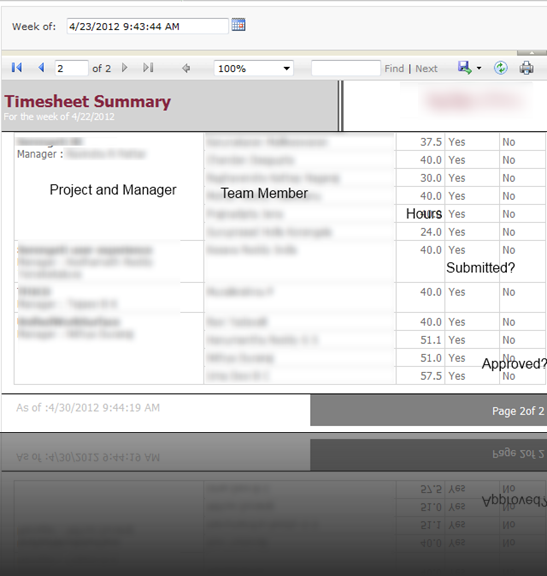
This must have given you an idea on how the plugin can be extended to serve multiple collections. Next part you will be interested in is getting report of who has filled timesheet in your organization. I used SSRS report, following is the query that I used to get the result.


SELECT prj.id, 
MAX( [ProjectName]) AS ProjectName,
MAX(ManagerName) AS ManagerName,
MAX(WeekStarting) AS WeekStarting,
dbo.TFSGetUserName(tc.sid) as DisplayPart, -- this is function i created to get the username
-- refer to the constants table easily.
Completed as EnteredTimeSheet,
(approved )as Closed,
MAX(prj.TeamSize) as TeamSize,
SUM(te.hours) as HoursLogged
FROM timesheetcompletions tc
JOIN Projects prj ON tc.projectCollectionId=prj.id
JOIN TimesheetEntries te on tc.sid = te.sid and tc.ProjectCollectionId = te.ProjectCollectionId
AND (te.entryDate &gt; tc.weekStarting AND te.entryDate &lt; DATEADD(DAY,7, tc.weekStarting ) )
where DATEADD(dd, 0, DATEDIFF(dd, 0, WeekStarting)) =DATEADD(dd, 0, DATEDIFF(dd, 0, @Startdate))
GROUP BY prj.id
, tc.sid


Report would look something like…


image


There is another interesting report involved, that is to figure out which contributor hasn’t filed his/her timesheet. Which is bit complex report compared to this one, I will write about it some other time.